How to update MB SD Connect C4 C5

 mb-sd-connect-c4-c5-update-4 (2)


This post comes with the introduction to update MB SD Connect Compact 5 /SD C4/ SD C4 PLUS.

Step 1: Change file name

There are two storage path for MB SD Connect Compact 4/ new SD C4 plus/ SD C5.

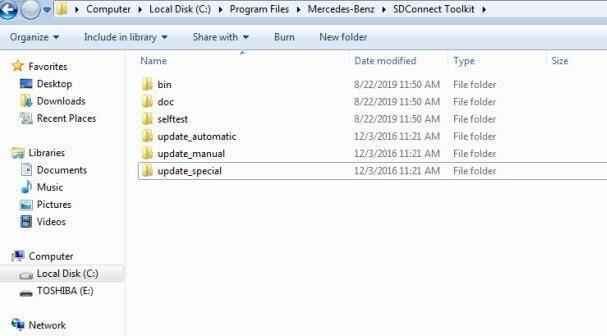
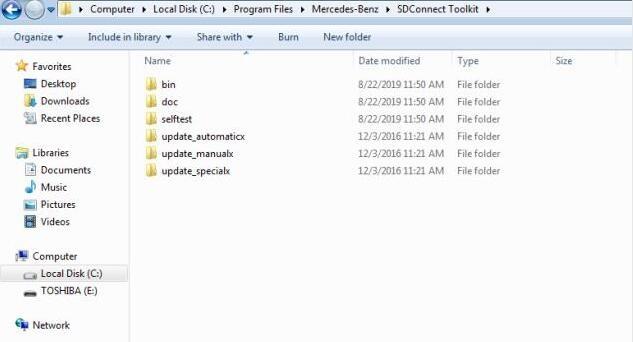
Path 1: C:\Program Files\Mercedes-Benz\SDConnect Toolkit

Path 2: C:\Program Files\Softing\Diagnostic Tool Set 8\8.03\Interfaces\DCDI_DPduApi\eCOM_Toolkit

Please modify the file name of “update_automaticx”, “update_manualx” and “update_specicalx” to “update_automatic”, “update_manual” and “update_specical”, it means remove the last letter of all the three file names.
mb-sd-connect-c4-c5-update-1 (2)
mb-sd-connect-c4-c5-update-2 (2)
mb-sd-connect-c4-c5-update-3 (2)
mb-sd-connect-c4-c5-update-4 (2)


Comments

Popular posts from this blog

How to Solve VW Amarok Caddy 2018+ Remote Not Working After Programming

Here comes the general problem of VW Amarok Caddy etc. 2018+ UDS protocol vehicles: 2019 VW Caddy. I spent a few hours programming the Xhorse key using VVDI2 . Also tried TDB1000. Remote function could not be obtained. Every time the programming failed, the original remote stopped working until I scanned and cleared errors. I expected it to work when the transponder was added (Megamos AES). I can’t access remote learning with any of my tools, nor did vvdi2 let me program the remote. I was wondering if anyone could confirm remote learning with transponders or how to learn it if not. Solution: It is not possible for BH remote controls after 2018 at the latest. You will not get any communication with the central locking remote control customization. You need a dealer key 100% and then learn from ODIS. There is no after-market solution, VAG blocked the remote channel on UDS vehicles 2018+. Had the exact same issues with new caddies. So merchant key and Odis ATM since the c...

OBDSTAR H111 for OPEL Key Programmer and Odometer Correction tool via OBD Extract PIN CODE

OBDSTAR H111  for Opel key programmer covers more than 90% models for Opel including old and new models. It can easily extract PIN CODE from BCM by selecting option “Auto” or “Manual”. In addition, it adopts the hardware and the shell of OBDSTAR H series, which keeps fast and stable software running. Comes with OBDII function and cluster calibration for some models for Opel, H111 is technical, professional and comprehensive auto key programmer. OBDSTAR H111 Feathers: 1.Covering more than 90% models for Opel 2.Extracting PINCDOE from BCM automatically and manually 3.Auto key programming and cluster calibration via OBD 4.Competitive price compared with similar device OBDSTAR H111 supported for Opel car list: Immo for OPEL Read security code By BCM System Auto Manual By Other System Immobiliser Select from vehicle Agila 2000-2008 Agila B -2009 2009- Antara Astra 1995-2004 Astra F 1995-2004 Astra G Astra...

GM MDI2 Software Tech2win interface

  What is Tech2win? Tech2Win is a Tech2 emulator for GM diagnostics. It allows you to use your J2534 card like a Tech2 on GM vehicles. Tech2Win is an application version of the Tech 2 and CANdi (Control Area Network Diagnostic Interface) module that can be used during automotive road testing, providing a larger display with all functions of the tool GM Tech2 GM Scanner . Tech2Win App provides all Tech 2 features and functionality for Opel, Saab, etc. What can gm tech 2 pc software do? GM Tech 2: This is the GM factory scan tool used in all GM dealers since 1996. Tech 2 will give your shop ‘dealer level’ capabilities on all GM vehicles insured. Scan, pull codes, graph data and have all two-way controls available for all vehicle systems including Powertrain, Body, Chassis, and Network Tech2win Specialized Diagnostic Software. 2. Tech2Win software features: 1. Tech2Win is designed to be used for diagnostic functions (No programming function) 2. Service programming func...